

 Dementia Support Line
Using video technology to connect people with dementia
Using low cost, easy to use, technology to connect people with dementia, so they can be actively involved together in community life, across England, Wales and Northern Ireland.
The purpose
The 3 Nations Dementia Working Group (3NDWG) was a network of people living with dementia. Until March 2026, they were the 'go-to group' for people seeking input from those with lived experience of dementia, in a professional or personal capacity.
The group agreed to try out free video conferencing once a month, in between the in-person meetings.
The purpose of connecting virtually was:
- To enable the group to meet and progress their activities without the stress, time and expenses required to travel long distances to meet in person.
- To reduce delays that happened when they tried to progress things only meeting in person every couple of months.
Preparing the group for the transition
Members of the group who had used video conference technologies offered insights from their experiences of different programmes. These members liked Zoom for a number of reasons:
- Free to use.
- Doesn’t require people to create a log-in.
- The meeting facilitator can invite people to join the meeting via a link in an email.
- People taking part in Zoom meetings access them via a link. This will usually open immediately on their computer, smartphone or iPad. It does not require a complicated download.
- The meeting facilitator does not need to obtain people's personal data to invite them to join the meeting - anyone with the link can join the meeting.
- People's personal information is not shared with other participants when using Zoom.
The project support officer provided step-by-step written instructions for members using Zoom for the first time. They set up trial calls with individual members of the group to talk them through participating and give them confidence that they could do it.
The first Zoom meeting
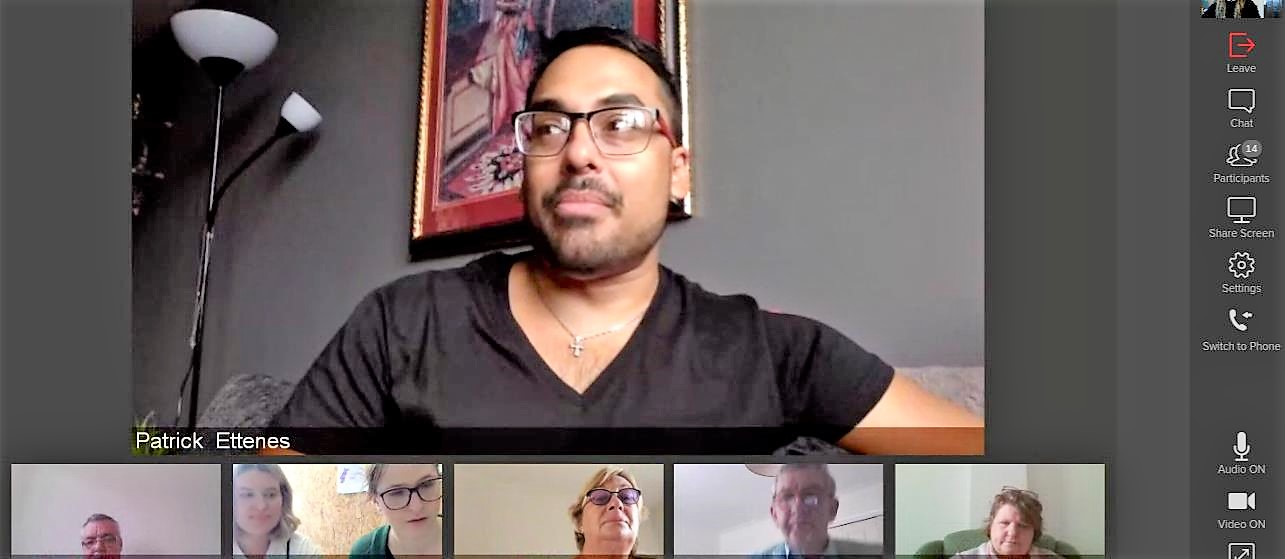
In December 2018, the 3NDWG steering group held their first scheduled meeting using Zoom.
About 10 people dialled in, and the call went smoothly.
The members of the group who took part in the meeting using Zoom gave feedback.
- People can write a message publicly or privately to the meeting facilitator ('host') making it easier to:
- put forward an idea or comment that they may not have felt comfortable with saying aloud. This is particularly useful for people who have difficulty with speaking, or who need a little longer to formulate a response.
- explain why they might need to take a break.
- People can take quick breaks if they need by:
- turning off the video
- muting their microphones.
- The feature where the screen jumps to whoever is talking
- is useful for knowing who is talking
- helps people to focus on one person instead of struggling to look at everyone
- made it feel like a natural conversation.
- People using iPads could easily download the app before the meeting and and then open the meeting.
- People can click a weblink to go straight into the meeting on their computer.
- People can opt to ‘raise their hand’, which allows the chair to keep the meeting on track and give everyone a chance to speak.
- One person said this relieved a lot of stress for her. In other types of video calls she said she had struggled to make herself heard.
The results
Due to the success of this first meeting, it was agreed that regular steering group meetings will be held via Zoom every month.
The group reflected on their experience and how to make the use of this technology work for all of them. They agreed:
- Video conferencing meetings should be for up to two hours long, but not longer than that.
- Two hours is enough time for the group to make quick decisions on projects and proposals, and to decide on which things they need to take to one of their face-to-face meetings.
- Video conferencing is a very useful way for the group to work at almost no cost and in significantly less time than their usual meetings.
- Using virtual meetings enable more people to join in from across the three nations, especially people who would not usually travel to events or meetings.
Since that first meeting, the group have used video conferences for several focus groups, including with external organisations.
- These included members who had not previously been involved in other events
- these members said afterwards on what a positive experience it had been!
- Video conferencing has been used to organise quick meetings to discuss a particular issue.
- This is enabling the 3NDWG to move on more quickly with their work, in particular their campaigning.
- Members of the group now feel confident using video conferencing individually and on an ad hoc basis.
- For example, one member now uses video conferencing to join an Alzheimer’s Society leadership team meeting with senior managers. The managers have commented on what value he has added to their meetings. This would not have been possible without the use of this technology, due to the relatively short length of the meeting and the many hours that the person with dementia would have had to travel to and from the meeting.
The group now plans to hold more events via video conference, and to open them up to include even more people with dementia.
What changed for people with dementia
Feedback
- Several people have said they were surprised how easy it is to use this technology.
- The regularity of meetings means this is a skill that people are maintaining, continuing to develop and passing on to other people with dementia.
- People say they feel empowered by having learned a new skill. They say this has helped them gain confidence and feel able to do more as a group.
- Increased number of activities so that they are able to meet more often, and without the stress of long distance travel.
- Better use of funding, time and energies:
- The money saved in this process means the group have more funds to put towards their campaigning aims and can invite more people to attend events.
- Being able to make quick decisions via video conference has cut out delays between meetings and during projects. This means projects are progressing more quickly.
Learning points
Allow time to support people and develop confidence using the technology.
Some people were reluctant to try a new platform and learn a new skill. With clear instructions and enough time beforehand to guide them through it, nearly all of them were confident using it in practice.
Don’t assume people are confident using it just because they haven’t spoken up; they may feel intimidated to say they don’t understand.
- Support people with dementia to plan their video conferences ahead for successful meetings each time. This reduces the risk of things going wrong. By sending several reminders leading up to the video conferencing call, people to check things like connectivity and remember to charge their devices.
Use video conferencing in addition to other ways of communicating, rather than instead of. Video conferencing isn’t for everyone. Some people with dementia find the format too intimidating, or prefer written communication. Other people with dementia may not have access to the technology or internet required for video conference meetings.
It has been important to remember not to conduct all the 3NDWG’s business using this one method so as not to exclude those who don’t use it.
- Video conferencing is good for shorter meetings. It is not suitable to expect people to sit all day looking at their screen without the usual support that would be in place for an in-person meeting of that length.
- Video conferencing works better with smaller groups of people with dementia.
- 3NDWG still conduct larger face to face meetings of the steering group. They use Zoom for subgroups working on individual projects such as the website. This means they don't take up too much valuable time at in-person meetings discussing things which some people may have no interest in or don’t understand.